Security | Threat Detection | Cyberattacks | DevSecOps | Compliance

How to Backup and Restore Mac machines | BDRSuite Demo

In this BDRSuite demo, I will guide you through configuring backup and performing recovery for files and folders on Mac machines. Overview: BDRSuite offers efficient backup solutions tailored for Mac systems, enabling agentless backups that simplify the process of protecting your data. The software provides flexible storage options, along with seamless file and folder recovery, ensuring your critical data is always safeguarded.

Introducing the Risk Management Dashboard

The Keeper Risk Management Dashboard is a powerful feature of the Keeper Admin Console that provides comprehensive security posture information covering end-user deployment, utilization, cloud configuration, and event monitoring. This critical data helps administrators ensure that risks are remediated and compliance is enforced effectively.

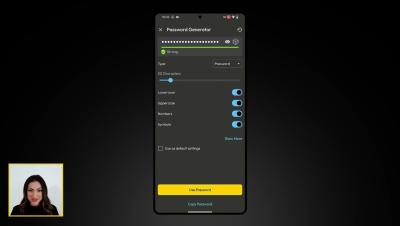
Introducing Passphrase Capabilities on Android

To generate a passphrase for a new or existing record on Android, tap the dice icon, select the dropdown menu next to “Type” and select Passphrase. You can customize your passphrase by setting the length, including capitals and numbers in the passphrase, and choosing from various symbols to separate the words. Passphrases can be up to 20 words long, with a minimum length of 5 words and each word including at least 3 characters. Check the box if you'd like to make your selections the default setting for all passphrases moving forward. Tap Use Passphrase or Copy Passphrase when you are done.