Join UpGuard's Chief Product Officer, Dan Bradbury, as he shines a spotlight on all of the groundbreaking product releases from the last quarter and the exciting releases coming soon.
Join Jess Hooper, our Senior Product Manager, as she outlines how UpGuard is launching a suite of new features that together represent the next step in the evolution of trust management.
Join Aaron Spiteri, Our Director of Third-Party Risk Management Services, as he outlines how UpGuard is reimagining our vendor risk assessment service from the ground up.
Learn from Neil Cameron of Peoplecare, Shahn Harris of Air New Zealand, and Andrew Bullen of St John Ambulance Group as they share how they’ve scaled their TPRM program.
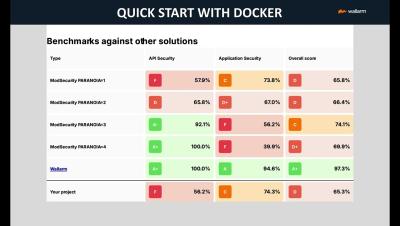
GoTestWAF is a tool for API and OWASP attack simulation that supports a wide range of API protocols including REST, GraphQL, gRPC, WebSockets, SOAP, XMLRPC, and others. It was designed to evaluate web application security solutions, such as API security proxies, Web Application Firewalls, IPS, API gateways, and others.
Sergey Belous, Product Manager, tells us about all the cool new updates to JumpCloud's Android management capabilities. Join us at 11:30 am ET. The #IT Hour hosted by #JumpCloud is a #communityprogram focused on the life of #ITAdministrators. With the ever changing #ITlandscape, having community and professional networking opportunities is very valuable. You can expect from our weekly conversations.
Urvashi H.V., Technical Community Champion, JumpCloud talks to Thomas Dias, Senior Technology & Operations Professional, Gautham Shet - Cyber Security Integration Lead, and Ketan Karnick - Head of Enterprise Security from the Circles.co IT team about how they use JumpCloud to solve their security challenges. The team tells us about how JumpCloud has helped them tighten security, as well as speed up repeated processes via integrations and automation.
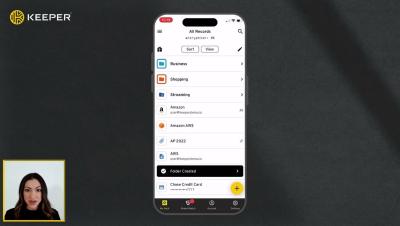
Keeper’s iOS mobile app makes it easy to securely share records with friends and family. To share a record with another Keeper user, select the record from your vault and tap Share, then Share with User. Enter the user's email address or select it from the dropdown, then use the toggle buttons to choose what permissions the user will receive such as: “Can Edit”, “Can Share” and "Make Owner". If you do not enable any permissions, the user will have “view only” access.
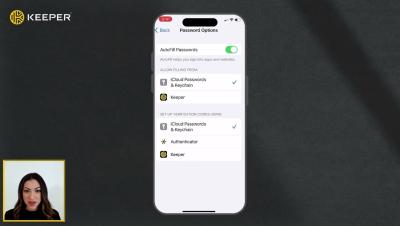
KeeperFill is Keeper’s powerful, autofilling feature that works across all devices and instantly logs you in to websites and apps, saving you both time and effort. Keeper is fully integrated into the login experience of every website and app through the Passwords button that appears above your device's keyboard. To utilize this feature you need to first perform a few setup steps.