
The Hidden NetSuite Delete-All-Data Risk: How to Recover Faster and Protect Historical Records
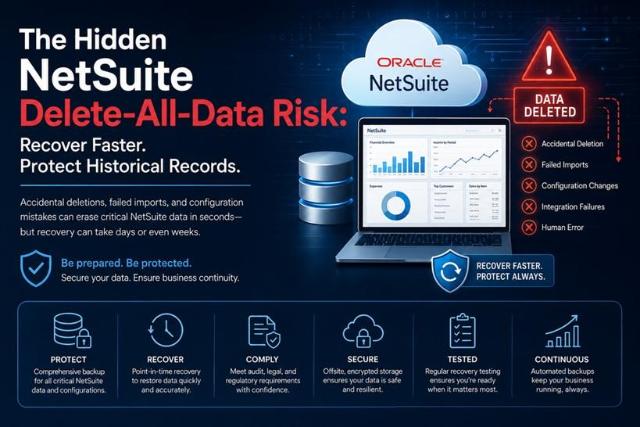
Enterprise Resource Planning (ERP) platforms have become the operational backbone of modern organizations. Finance teams rely on them for reporting and compliance, operations teams depend on them for workflows, and executives use them to make business-critical decisions.
Because of this reliance, most organizations assume their ERP data is always recoverable. However, one often-overlooked risk in cloud ERP environments is the possibility of large-scale data deletion, accidental overwrites, failed imports, or configuration changes that impact historical records.
For organizations using NetSuite, understanding how to prepare for these scenarios can significantly reduce downtime, compliance exposure, and operational disruption.
Understanding the Delete-All-Data Risk
When people think about data loss, they often imagine cyberattacks or hardware failures. In reality, many ERP data incidents originate from routine administrative activities.
Common causes include:
- Bulk import errors
- Incorrect CSV uploads
- Sandbox refreshes
- Workflow misconfigurations
- Script deployment issues
- Integration failures
- Human error during record maintenance
- Unauthorized or accidental deletions
In complex environments, a single mistake can affect thousands of records within minutes. Customer records, financial transactions, vendor information, inventory data, and custom objects may all be impacted.
The challenge becomes even greater when organizations discover the issue days or weeks after the change occurred.
Why Historical Records Matter
Historical ERP data serves a purpose beyond day-to-day operations.
Organizations often need historical records for:
- Financial audits
- Regulatory compliance
- Tax reporting
- Internal investigations
- Business continuity planning
- Trend analysis
- Contract validation
- Legal discovery requirements
|
Incident Type |
Operational Impact |
Recovery Complexity |
Business Risk |
|
Accidental Record Deletion |
Medium |
Medium |
High |
|
Bulk Import Error |
High |
High |
High |
|
Sandbox Refresh Issue |
Medium |
Medium |
Medium |
|
Script Deployment Failure |
High |
High |
High |
|
Integration Failure |
High |
High |
High |
|
Financial Data Corruption |
Very High |
Very High |
Critical |
When historical information becomes unavailable or corrupted, organizations may face operational delays, compliance concerns, and increased recovery costs.
For finance teams, missing transaction histories can complicate month-end close activities. For auditors, incomplete records can raise questions about governance and internal controls.
The Recovery Challenge in Modern ERP Environments
Many organizations assume that recovering deleted ERP records is a straightforward process. Unfortunately, recovery can become complicated when multiple data relationships are involved.
For example:
- Customer records may connect to invoices and payments.
- Vendor records may connect to procurement workflows.
- Employee records may connect to approvals and expense reporting.
- Inventory records may impact fulfillment and financial reporting.
Restoring a single record is often easier than rebuilding an interconnected data structure.
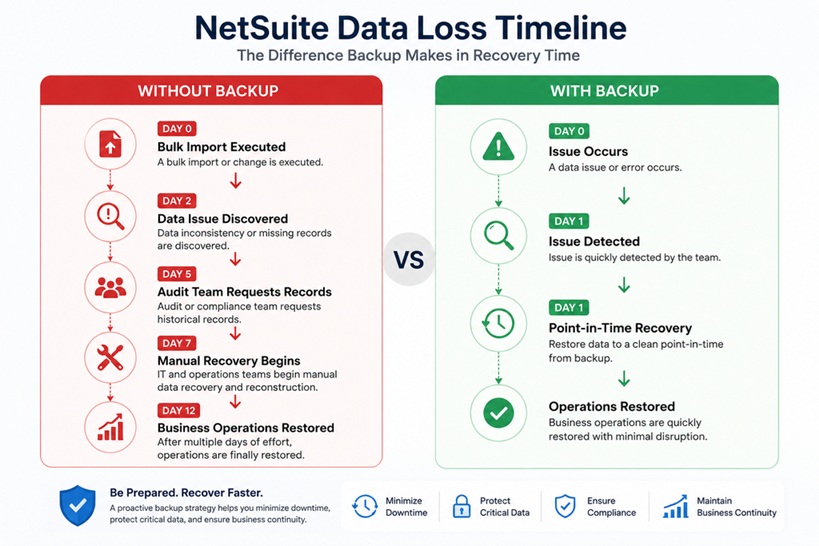
The longer an issue remains undetected, the more difficult recovery becomes because additional transactions may have already occurred.
The Cost of Delayed Recovery
Data loss incidents affect more than IT teams.
A significant ERP disruption can create:
Operational Downtime
Employees may lose access to critical information required for daily business processes.
Reduced Productivity
Teams often spend hours or days manually recreating records and validating data accuracy.
Compliance Exposure
Missing records can complicate audits and increase regulatory scrutiny.
Financial Impact
Incorrect financial data may affect reporting accuracy, forecasting, and decision-making.
Customer Experience Risks
Data inconsistencies can disrupt order processing, billing, and support operations.
Even relatively small incidents can generate substantial indirect costs when multiple departments are affected.
How Recovery Challenges Grow Over Time
Building a Strong NetSuite Backup Strategy
The most effective way to reduce recovery risk is to establish a comprehensive backup and recovery plan before an incident occurs.
An effective strategy should include:
Comprehensive Data Coverage
Organizations should identify all critical information that requires protection, including:
- Transaction records
- Financial data
- Customer information
- Vendor records
- Saved searches
- Custom fields
- Workflows
- Scripts
- Configuration settings
Defined Recovery Objectives
Recovery goals should be clearly documented, including:
- Recovery Time Objective (RTO)
- Recovery Point Objective (RPO)
- Business continuity requirements
These metrics help organizations determine how quickly systems and data must be restored.
Regular Validation
Backup processes should be tested regularly to verify that recovery procedures work as expected.
Testing often reveals gaps that remain unnoticed until a real incident occurs.
How Often Does NetSuite Backup Data?
One common question organizations ask is, "How often does NetSuite backup data?"
The answer depends on the organization's overall data protection strategy and recovery requirements.
While cloud ERP providers maintain platform availability and resilience, organizations should evaluate whether native protections align with their business continuity objectives.
Companies handling large transaction volumes, financial reporting, or compliance-sensitive information often require additional retention, monitoring, and recovery capabilities to meet internal governance requirements.
The Role of Independent Backup Solutions
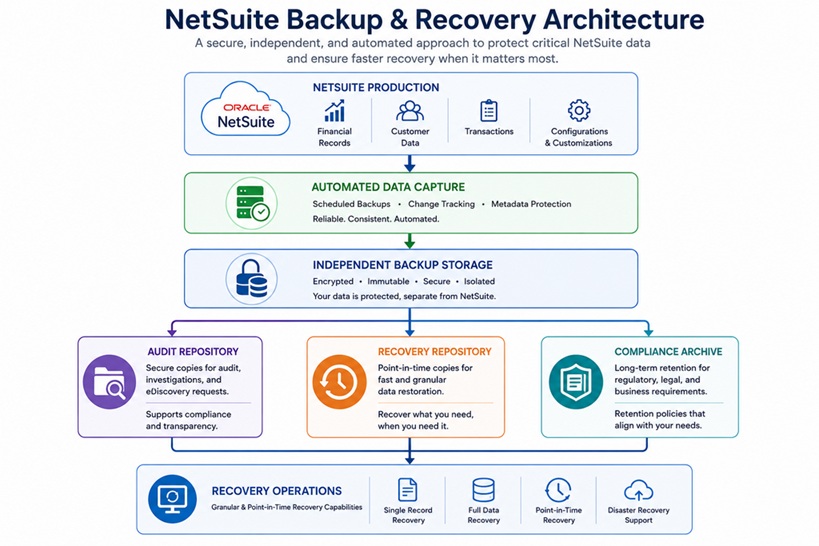
As ERP environments become more complex, many organizations implement independent data protection strategies to improve recovery readiness.
A dedicated NetSuite backup approach can help preserve historical records, support faster recovery workflows, and provide additional protection against accidental deletion, configuration mistakes, and large-scale data modification events.
Independent backup architectures also help organizations maintain greater control over retention policies and long-term record preservation.
Developing a NetSuite Backup Policy
Every organization should maintain a documented NetSuite backup policy that defines:
- Data protection responsibilities
- Backup frequency
- Retention requirements
- Recovery procedures
- Compliance obligations
- Testing schedules
- Incident response processes
A formal policy helps align IT, finance, security, and compliance teams around shared recovery objectives.
Evaluating NetSuite Backup Solutions
When reviewing NetSuite backup solutions, organizations should consider:
- Automated backup capabilities
- Recovery granularity
- Long-term retention options
- Audit support
- Security controls
- Encryption standards
- Recovery testing functionality
- Scalability requirements
The goal is not simply to store copies of data but to ensure information can be recovered efficiently when needed.
Preparing for the Unexpected
No organization expects a major ERP data loss event. Yet history consistently shows that human error, integration failures, and configuration mistakes remain common causes of disruption.
The organizations that recover fastest are typically those that prepare in advance.
By implementing a structured NetSuite data backup strategy, documenting recovery procedures, and regularly testing restoration processes, businesses can better protect historical records and minimize the operational impact of unexpected data incidents.
As ERP environments continue to evolve, proactive recovery planning is becoming just as important as cybersecurity, compliance, and business continuity itself.