
12 Best MCP Security Tools: Which Ones See Local Servers on Developer Laptops?

Image Source: depositphotos.com
Model Context Protocol (MCP) servers can read your files, your tokens, and your build scripts. When a server runs as a quiet stdio process on a developer laptop, every gateway, proxy, and SIEM that inspects only HTTP traffic loses sight of it. The NSA's Artificial Intelligence Security Center covered this ground in its 20 May 2026 information sheet on MCP security design, which advises keeping data processing local where possible and separating components by trust level. Running a server locally satisfies the first point. It does nothing for the second unless somebody can see the process. We read the documentation and the repositories behind 12 MCP security tools to answer one question: which of them notice a server that never speaks HTTP?
Quick answer, which tools catch a rogue MCP server on your laptop?
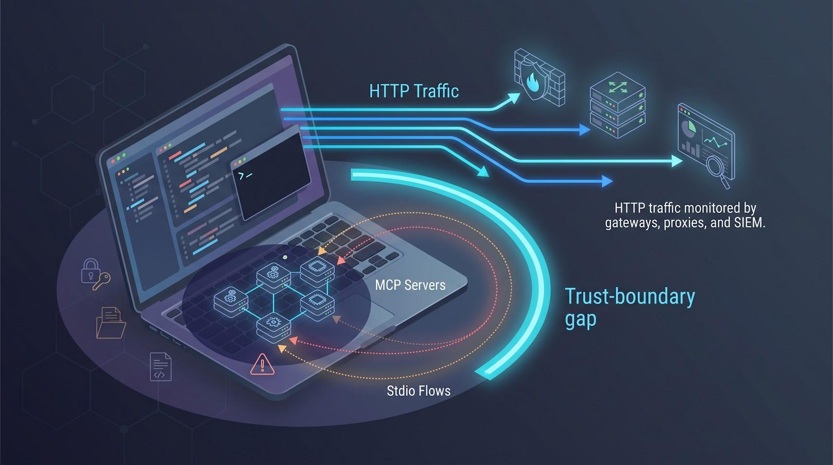
You need a snapshot of which products notice a stdio server that never touches the network. We graded each tool on what it does and where it sits, starting with visibility.
|
Tool |
Broad endpoint discovery |
Config / enrolled-device discovery |
Managed local servers only |
Routed traffic only |
Inline blocking |
|
Backslash Security |
✅ |
✅ |
No |
No |
✅ |
|
Obot + Sentry |
No |
✅ |
✅ |
No |
✅ |
|
Snyk Agent Scan |
✅ |
✅ |
No |
No |
No |
|
Cisco MCP Scanner |
No |
✅ |
No |
No |
No |
|
Akto Atlas |
◐ |
✅ |
No |
No |
✅ |
|
ToolHive |
No |
No |
✅ |
No |
✅ |
|
Docker MCP Gateway |
No |
No |
✅ |
No |
✅ |
|
Lasso MCP Gateway |
No |
No |
✅ |
No |
✅ |
|
MCP Defender |
No |
No |
No |
✅ |
✅ |
|
IBM ContextForge |
No |
No |
No |
✅ |
✅ |
|
agentgateway |
No |
No |
No |
✅ |
✅ |
|
Noma Access Control |
No |
◐ |
No |
✅ |
✅ |
Legend
✅ = documented support, ◐ = partial or client specific, No = not documented
Only three tools, Backslash, Obot with its Sentry agent, and Snyk Agent Scan, look for unsanctioned servers across a machine rather than only at the ones you hand them. Gateways such as agentgateway or ContextForge enforce rich policy once traffic leaves the client, but they never see a process that stays local.
How we selected and ranked the best MCP security tools
Choosing an MCP security tool should not feel like guesswork. We built a six-factor scorecard and weighted each item by how much it protects a developer laptop:
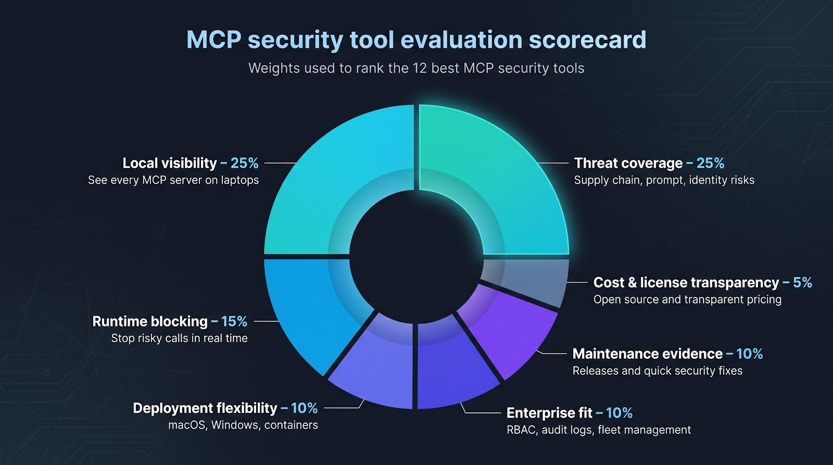
- Local visibility, 25 percent. If a tool cannot see the server, nothing else matters.
- Threat coverage, 25 percent. Supply chain risk, prompt manipulation, runtime privilege, and identity abuse should appear in one view.
- Runtime blocking, 15 percent. Finding issues is good. Stopping the call is better.
- Deployment flexibility, 10 percent. macOS, Windows, containers, and Kubernetes all need support.
- Enterprise fit, 10 percent. Access control, audit logs, and fleet management decide whether a pilot can scale.
- Maintenance evidence, 10 percent. We checked each project's own repository for signs it is actively worked on. We do not print version numbers or dates here, because they are wrong within a week.
- Cost and license transparency, 5 percent. A license you can read in the repository beats a sales form.
Local visibility and threat coverage carry the joint heaviest weight, 25 percent each, and they tie on purpose. A tool that sees everything and stops nothing, and a tool that stops everything it can see, are both half a control. When two tools finish level, we favor the one with broader local discovery. We start at the top, with the option that watches every process a developer starts.
1. Backslash Security: best for finding unsanctioned MCP servers on employee laptops
Backslash Security runs on each laptop rather than in the network path, so it sees an agent or MCP server at the moment it starts. The vendor describes the product as an agentic AI fabric across all endpoints, seen, governed, and protected in real time.
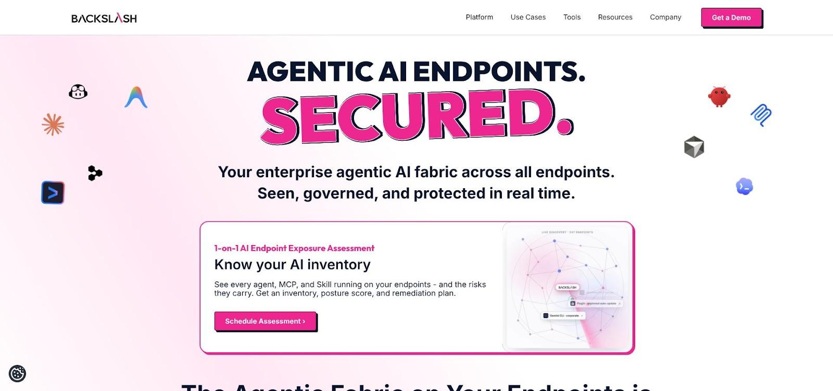
The Backslash Security marketing home page, where the company publishes its endpoint discovery claims.
According to its own product pages, Backslash:
- inventories every agent, MCP, and skill running on your endpoints, including agents, MCP servers, skills, rules, hooks, and plugins installed under personal accounts and never reported to IT;
- flags or blocks risky behavior as it happens, naming prompt injection, tool poisoning, scope abuse, data exfiltration, and suspicious agent activity;
- creates an audit trail of harness-layer events, covering prompt injection activity, MCP communications, agent network access, and file access.
Because the agent sits on the machine and watches the harness rather than the wire, calls that never touch HTTP stay visible. Backslash positions this as a layer of its own, stating plainly that none of EDR, DLP, AppSec, or network gateways cover it. Read the product that way. It is not a gateway, a proxy, or a scanner you point at a config file, and it answers a narrower question that most of the other 11 tools cannot: what is running right now on this laptop that nobody approved?
The trade-off is that Backslash is a commercial product with no public repository to read, so the capability list above is the vendor's own. If shadow MCP servers on developer machines are your main concern, it is the one tool here built for exactly that job.
Local-server verdict: broad endpoint discovery with inline blocking.
2. Obot: best open-source platform for gateway and device-level governance
Obot pairs a self-hosted MCP gateway with a device agent called Obot Sentry. The gateway is a single governed entry point to every MCP server a user is allowed to reach, and it manages server access, credentials, and request and response filtering. Sentry extends that governance to AI activity happening directly on user devices.
Sentry is the part that matters for laptops. It inventories installed AI clients, MCP servers, skills, and plugins, and installs hooks for development tools including Claude Code, Codex, and Cursor. It records local tool calls alongside the activity passing through the gateway, so a security team sees both halves in one place.
Once a server is approved, Obot runs agents and MCP servers in isolated execution environments outside the main server process, hosting them as Docker containers or Kubernetes workloads with domain-based egress rules through a configured network-policy provider. Credentials are handled centrally, covering MCP OAuth, user and shared credentials, and Kubernetes secret bindings, and clients authenticate with scoped API keys.
The repository states an MIT license, so you can audit the code and host the gateway yourself. The catch is coverage: Sentry only reports from machines where Sentry is installed, so a laptop outside your deployment tooling stays dark.
Local-server verdict: discovers unsanctioned servers on enrolled devices and blocks risky calls once Sentry is installed.
3. Snyk Agent Scan: best for rooting out risky configs across every IDE
Snyk Agent Scan treats each laptop like digital evidence. The CLI discovers and scans agent components on your machine, covering agents, MCP servers, skills, tool descriptions, and prompts, across system, user, project, and extension scopes. It runs on macOS, Linux, and Windows.
The client list is the broadest of any tool here. The repository names Windsurf, Cursor, VS Code, GitHub Copilot, Claude Desktop, Claude Code, Gemini CLI, Codex, Amazon Q, and several more. Every hit is graded against 14 distinct security risks, including prompt injection, untrusted content, private data exposure, destructive capabilities, malicious code, and credential handling. Results come back as JSON you can feed into CI or a SIEM.
Read the safety note before your first run. To fetch tool descriptions, Agent Scan connects to configured remote MCP server URLs and starts stdio MCP servers by executing the commands in the config. The repository warns you to scan untrusted configs in a sandbox, and interactive mode asks for consent before contacting a server. Run first passes in a disposable VM.
A background mode supports MDM rollout and reports findings to a Snyk Evo instance for fleet monitoring. It never blocks a runtime call, so pair it with an endpoint agent or a proxy. The repository states an Apache-2.0 license.
Local-server verdict: full configuration and component discovery, reports only, no inline enforcement.
4. ToolHive: best for isolating approved MCP servers on laptops and clusters
ToolHive describes itself as an enterprise-grade platform for running and managing MCP servers, and it solves a different problem: let developers run local servers without letting those servers wander. Launch a server through ToolHive and it runs in an isolated container, locally via Docker or Podman, or in the cloud via Kubernetes.
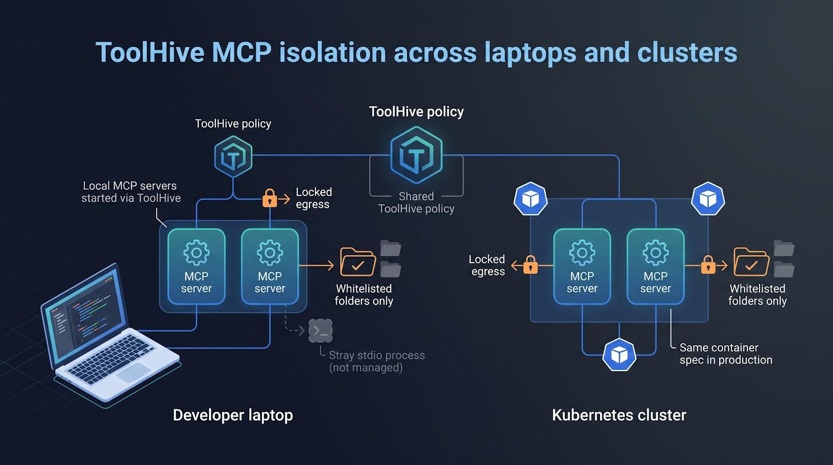
Policy travels with the workload. The platform enforces identity and access policy per request through OIDC and OAuth identity providers, lets you define access policies and network endpoints, and supports tool filtering. A registry component lets an organization curate a catalog of trusted servers with controls for verification and signing, drawing on official MCP registries or your own additions. A Kubernetes operator handles fleet and resource management through custom resource definitions, secrets are stored encrypted, and ToolHive connects managed servers to clients including Claude Desktop, Cursor, and VS Code so the server still feels native in the editor.
Note the boundary in the diagram above. ToolHive secures what you start through it, and a stray stdio process launched by an IDE extension is not managed. Pair it with Snyk Agent Scan or Backslash for discovery, then promote known-good servers into the ToolHive registry. The repository states an Apache 2.0 license.
Local-server verdict: protects servers launched through ToolHive, does not discover stray processes.
5. IBM ContextForge: best extensible open-source gateway and registry
IBM ContextForge is an open-source registry and proxy that federates tools, agents, and APIs into one clean endpoint for your AI clients. It sits in front of MCP servers, A2A agents, and REST or gRPC APIs, and gives you one place to apply governance, discovery, and observability.
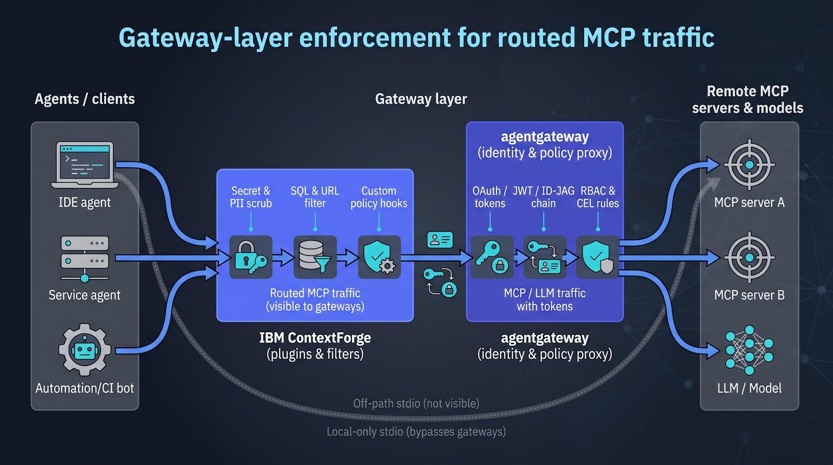
Its strength is the plugin framework. The repository counts more than 40 plugins for extra transports, protocols, and integrations, covering jobs such as PII and secret filtering and calls out to external AI safety services. Virtual servers let you bundle tools from several upstream services behind one endpoint, a practical way to give a single agent a narrow toolset. Transport support is wide: HTTP, JSON-RPC, WebSocket, SSE, and Streamable HTTP, with stdio available for server-side use. Built-in auth, retries, and rate limiting work with user-scoped OAuth tokens, and OpenTelemetry output reaches Phoenix, Jaeger, Zipkin, and other OTLP backends.
Read two warnings before you deploy. The repository states that the mcp-servers/ directory holds unsupported sample and test servers that do not go through the same review and security rigor as the core codebase and should not be run in production. It also warns you never to run untrusted MCP servers directly on your local filesystem. The repository states an Apache License 2.0.
Local-server verdict: governs servers routed through the gateway, no arbitrary laptop discovery.
6. agentgateway: best for cloud-native authorization and identity
agentgateway decides who may call what. The repository describes it as an open source proxy built on AI-native protocols, MCP and A2A, that provides drop-in security, observability, and governance for agent-to-LLM, agent-to-tool, and agent-to-agent communication. It ships three gateway modes: an LLM gateway with a unified OpenAI-compatible API, an MCP gateway, and an A2A gateway.
The authorization model is the reason to pick it. Authentication covers JWT, API keys, and OAuth. Authorization uses fine-grained role-based access control with a CEL policy engine, so a rule can be as specific as a single argument on a single tool, alongside rate limiting and TLS. MCP federation pulls tools from several servers behind one endpoint across stdio, HTTP, SSE, and Streamable HTTP transports, plus OpenAPI, and OpenTelemetry provides metrics, logs, and distributed traces.
You give up laptop discovery for that identity power. agentgateway governs routed traffic only, so a stdio server an IDE extension starts on its own is outside its view. Pair it with an endpoint watcher if shadow servers worry you. The project is distributed under the Apache 2.0 license and maintained as a Linux Foundation project, a reasonable signal for anything you plan to put in a critical path.
Local-server verdict: enforces policy on routed traffic, no visibility into off-path stdio processes.
7. Cisco MCP Scanner: best multi-engine security scanner
Cisco MCP Scanner is a Python tool for scanning MCP servers and tools for potential security findings. It runs three main engines, YARA pattern rules, an LLM-based semantic analyzer, and the Cisco AI Defense API, and adds specialized analyzers for VirusTotal malware checks, behavioral code analysis, vulnerable package scanning, and prompt defense.
Its input list is the widest here. It scans remote MCP server URLs over SSE or HTTP, stdio servers launched locally, MCP configuration files, static JSON, PyPI and npm packages, and plain files and directories. On a laptop, the --scan-known-configs flag discovers and scans MCP servers from well-known client configuration locations, which the repository names as Windsurf, Cursor, Claude, and VS Code. Output comes as summary, detailed, table, by-severity, or raw JSON, and an offline static mode fits CI pipelines and air-gapped environments with no live server connections.
The scanner performs analysis only. It does not block or prevent a tool from executing at runtime, so treat it as a microscope that finds the pathogen and leave quarantine to a gateway or an endpoint agent. That breadth of inputs makes it a better fit for a pipeline stage than for the wire. The repository states an Apache 2.0 license.
Local-server verdict: discovers supported configs, scan-time only, no continuous enforcement.
8. Docker MCP Gateway: best for container-native governance
Docker MCP Gateway is a CLI plugin that standardizes how AI applications connect to external tools, acting as a routing layer between clients and multiple MCP servers. For teams already committed to Docker it adds MCP guardrails without changing the workflow.
Isolation is the core of it. Each local MCP server in the catalog runs in an isolated Docker container, and npx and uvx servers get minimal host privileges to keep the boundary intact. Credentials are handled through Docker Desktop rather than environment variables, and built-in OAuth flows cover service authentication. Servers come from the Docker MCP Catalog and other OCI registries, so a team can reference and share a collection by standard image reference, and built-in logging and call tracing cover observability. Clients including VS Code, Cursor, and Claude Desktop connect to one gateway configuration over stdio, streaming, or SSE.
Scope is the trade-off, and it is the same one ToolHive makes. Visibility ends at servers launched through Docker. A rogue stdio process an IDE extension starts stays invisible until a scanner such as Snyk Agent Scan or an endpoint agent such as Backslash finds it. The repository states an MIT license.
Local-server verdict: secures Docker-managed local servers, no discovery outside the container ecosystem.
9. Akto Atlas: best provisional pick for endpoint and IDE-level controls
Akto sells two named products on its own site, Akto Atlas for Employees and Akto Argus for Homegrown Apps. Atlas is the one that concerns laptops. The company describes real-time MCP and AI agent discovery that automatically catalogs MCPs, AI agents, tools, and resources, and says its coverage spans infrastructure, cloud, and employee laptops. Alongside discovery it lists agentic security posture management, MCP and AI agent guardrails, automated agentic red teaming, and agentic runtime protection.
Akto's own endpoint documentation is more concrete than its marketing. The Claude CLI hook intercepts prompts before they reach the model, MCP tool calls before they execute, and responses after generation. A sync-mode setting decides the posture: one value blocks threats, the other reports but allows execution. Tool calls are recorded as JSON-RPC tools/call events, and built-in tools such as Bash and Edit are not ingested unless you opt in.
Two things keep Akto lower in this ranking. Installation in those docs means placing hook scripts under the user's home directory, with an automated deployment script offered as an example, and no fleet management platform is named there. The product is also commercial, with no public repository to read. Confirm client coverage and rollout mechanics with Akto before a fleet-wide commitment. The endpoint-first stance still fills a gap few rivals cover.
Local-server verdict: partial discovery through client hooks, confirm breadth before production use.
10. Lasso MCP Gateway: best security-first open-source gateway
Lasso MCP Gateway acts as an intermediary between LLMs and other MCP servers. It reads an mcp.json file, then wraps and manages each underlying server individually, which makes it a practical way to put guardrails around a set of servers you already use.
The guardrails ship as three plugins. Basic masks tokens and secrets, naming Azure, GitHub, and GCP API keys, AWS tokens, JWTs, Slack, and Hugging Face credentials. Presidio identifies and anonymizes PII, including credit cards, IP addresses, emails, phone numbers, and social security numbers. The Lasso plugin combines PII and token masking with custom policies, prompt injection detection, and harmful content filtering.
Be precise about what the scanner inspects, because this one is easy to overstate. It runs before a server loads and does two things: reputation analysis drawing on marketplace and GitHub data, and tool description scanning that looks for hidden instructions, sensitive file patterns, and malicious actions. It reads the text a server advertises about itself. Servers then carry a status field of passed, blocked, or skipped. For logging, the xetrack plugin writes structured records through loguru into SQLite or DuckDB, capturing tool calls with timestamps, parameters, and responses. The repository states an MIT license.
Local-server verdict: protects configured or routed servers, no passive laptop discovery.
11. Noma Agent Access Control: best for enterprise-grade identity governance
Noma Security treats each agent and MCP server as a first-class identity. Its Agent Access Control lets you define which agents are approved, what data they can access, and what actions they can take, enforcing policies in real time, before actions are carried out. Security teams write those rules the way they already write them for SaaS apps.
The discovery side is the part to read carefully. Noma says its posture management finds every agent, model, MCP server, and tool across your cloud, SaaS, and developer environments, and claims teams typically find 10 to 100 times more agents than they expect. What the public site does not claim is discovery of a private stdio server on an individual laptop. If that is your requirement, make it the first question in a proof of concept rather than an assumption.
Runtime coverage is stronger. Noma's detection and response monitors the full behavioral chain of every agent session, meaning prompts, tool calls, data access, and actions, and flags prompt injection, data exfiltration, and scope violations in real time. An Open Enforcement model applies one policy across agent hooks and gateways. The site names no SIEM destination, so confirm log export during evaluation. The product is commercial, with no public repository.
Local-server verdict: laptop discovery not claimed, gateway enforcement and behavioral monitoring are strong once a server is in inventory.
12. MCP Defender: best lightweight desktop firewall for solo devs
MCP Defender is the seatbelt of this list. Install the desktop app, launch your editor, and all MCP tool call requests and responses from your AI apps are automatically proxied through it. The repository names Cursor, Claude, Visual Studio Code, and Windsurf as the protected applications. Intercepted data is checked against a signature set, and you are alerted to allow or block anything that looks harmful.
Simplicity has limits, and they are the ones you would expect. Defender inspects only the traffic it proxies. A stdio process that never routes through the app stays invisible, the same blind spot the gateways have on a smaller scale. It also has the narrowest platform story here: the repository documents a Mac download and does not mention Windows support.
The repository states an AGPL-3.0 license and notes that MCP Defender has been acquired by Docker Inc. That is worth knowing if you are deciding whether to build a process around the standalone app or wait to see where the capability lands inside Docker's own tooling. For an individual developer who wants an ask-me-first checkpoint without corporate overhead, it remains a quick win.
Local-server verdict: protects supported apps through automatic proxying, blind to off-path stdio servers.
MCP security tools comparison table
Need a quick snapshot? The grid below shows which tools can spot local servers, block risky calls, and fit your deployment style. Use it when shortlisting vendors or reviewing gaps in your current stack.
|
Rank |
Tool |
Local discovery |
Runtime blocking |
Self-host |
License |
Best single use case |
|
1 |
Backslash Security |
✅ broad |
✅ |
No |
Commercial |
Continuous laptop visibility with an inline kill switch |
|
2 |
Obot + Sentry |
◐ enrolled |
✅ |
✅ |
MIT |
Unified gateway and endpoint control plane |
|
3 |
Snyk Agent Scan |
✅ scan-time |
No |
✅ |
Apache-2.0 |
CI or MDM sweeps for risky configs |
|
4 |
ToolHive |
No, managed |
✅ |
✅ |
Apache-2.0 |
Container isolation for approved servers |
|
5 |
IBM ContextForge |
No, routed |
✅ |
✅ |
Apache-2.0 |
Extensible gateway with plugin hooks |
|
6 |
agentgateway |
No, routed |
✅ |
✅ |
Apache-2.0 |
Identity-aware policy enforcement |
|
7 |
Cisco MCP Scanner |
◐ configs |
No |
✅ |
Apache-2.0 |
Multi-engine risk scoring in pipelines |
|
8 |
Docker MCP Gateway |
No, managed |
✅ |
✅ |
MIT |
Container-native guardrails for Docker teams |
|
9 |
Akto Atlas |
◐ hooks |
✅ |
No |
Commercial |
Client-level hooks for developer fleets |
|
10 |
Lasso MCP Gateway |
No, routed |
✅ |
✅ |
MIT |
Secret and PII scrubbing on a shoestring |
|
11 |
Noma Access Control |
◐ cloud and dev environments |
✅ |
No |
Commercial |
Enterprise identity governance for agents and tools |
|
12 |
MCP Defender |
No, proxied apps |
✅ |
✅ |
AGPL-3.0 |
Lightweight desktop firewall for solo developers |
Legend: ✅ = documented support, ◐ = partial or scoped, No = not documented
The picture above is the honest summary of this category. Endpoint-first tools, Backslash, Obot, and Snyk, are the only ones that go looking, and they differ on whether they can stop what they find. Gateways handle policy and content inspection well, but every one of them depends on traffic flowing through them first. Isolation layers such as ToolHive and Docker lock down approved servers and will not find unknown ones. Scanners read the most file formats and enforce nothing.
That is why no single row wins outright. Most teams need one tool that looks at the laptop and one that sits on the wire. The useful question is not which of the best MCP security tools is best overall, but which blind spot is costing you the most right now. Start there, then add the second layer.