
11 Director-Inspired Anime Styles and When to Use Each
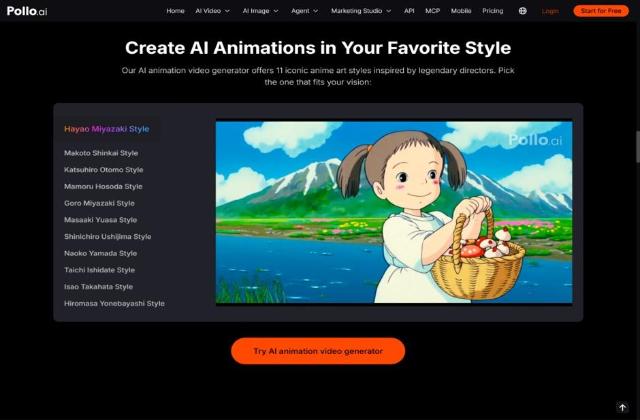
Choosing an animation style for an app promo, onboarding video or game trailer is a design decision that shapes how a product feels before anyone installs it. Anime-inspired looks are popular for games, social apps and creator tools, but "anime" is not one style. This guide walks through 11 director-inspired looks and when each one suits a launch video, so you can brief your team or your tools with a clear direction.
How Do You Choose an Animation Style for a Product Video?
Director-inspired anime styles are visual looks built from the colour, lighting, pacing and character design that audiences associate with well-known Japanese directors. For product teams they work like a creative brief: pick the feeling you want users to have, then pick the style that matches it. Three questions narrow the choice:
- What should viewers feel? Calm, wonder, tension or fun.
- Where will the clip run? App store, onboarding, social ads or a game trailer.
- How much detail can the format show? A busy city scene can get lost on a phone screen.
Once you have a direction, you can test it quickly with an AI animation video generator by describing the look in a prompt or choosing a matching preset, then comparing two options on the same scene before you commit.
Which Style Fits Which Project?
Match the style's mood to the feeling your product should give on first impression. Here are the 11 looks, from warm to bold.
1. Hayao Miyazaki Style: Warm Wonder
Soft, nature-rich scenes and gentle motion with a sense of wonder. Use it for family apps, education and wellness onboarding. If you want a starting visual, you can turn your own photos into Ghibli-style images first and animate from there.
2. Makoto Shinkai Style: Luminous and Romantic
Glowing skies, rain and detailed city backdrops that feel emotional. Use it for travel, dating and music apps, and heartfelt launch stories.
3. Katsuhiro Otomo Style: Dense and Dramatic
Gritty, highly detailed futuristic cities and intense action. Use it for sci-fi games and trailers for AI or cyber products.
4. Mamoru Hosoda Style: Bright Digital Adventure
Open skies and playful digital worlds with an adventurous mood. Use it for social apps, kids' tools and community launches.
5. Goro Miyazaki Style: Gentle Ghibli Lineage
A calm, story-led look from the Ghibli lineage. Use it for heritage brands and nostalgic stories.
6. Masaaki Yuasa Style: Fluid and Experimental
Elastic, energetic motion and bold colour. Use it for music apps, creative tools and playful ads.
7. Shinichiro Ushijima Style: Tender Youth Drama
An emotional coming-of-age feel. Use it for messaging, wellbeing apps and personal-story campaigns.
8. Naoko Yamada Style: Delicate and Intimate
Soft light, close-ups and quiet emotion. Use it for journaling, communication and mindfulness apps.
9. Taichi Ishidate Style: Polished Character Drama
Refined, expressive characters with rich lighting. Use it for premium story trailers and subscription services.
10. Isao Takahata Style: Grounded and Naturalistic
Everyday realism with a gentle hand-drawn feel. Use it for explainers and education content that should feel honest, not flashy.
11. Hiromasa Yonebayashi Style: Whimsical Small-Scale Fantasy
Intricate backgrounds, with plants, water and light carrying the mood. Use it for kids' apps, creative tools and cosy games.
How Do the 11 Styles Compare at a Glance?
Group them by mood: warm, luminous, bold or intimate.
|
Mood |
Styles |
Best for |
|
Warm and gentle |
Hayao Miyazaki, Goro Miyazaki, Yonebayashi |
Family, education, wellness, cosy games |
|
Luminous and romantic |
Shinkai, Ushijima, Yamada |
Travel, music, messaging, wellbeing |
|
Bold and energetic |
Otomo, Yuasa, Hosoda |
Games, creative tools, social launches |
|
Polished and grounded |
Ishidate, Takahata |
Premium trailers, explainers |
How Do You Apply a Style in an AI Animation Generator?
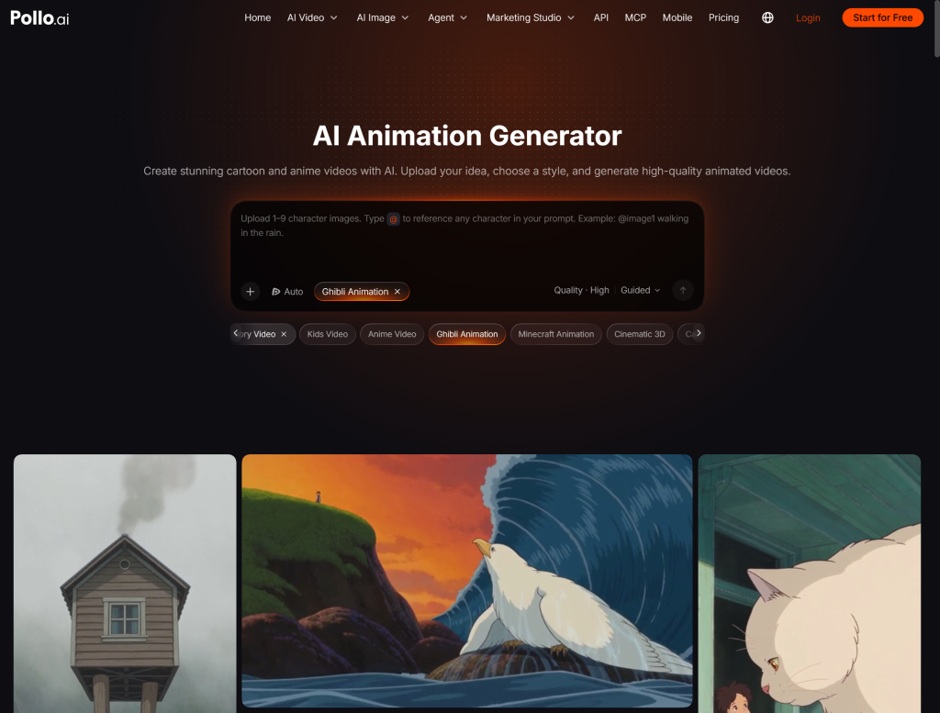
Write one scene, pick a style, and test two styles on the same prompt before you commit. Here is the workflow:
- Write the scene. Describe the subject, action and setting in one or two sentences.
- Define the visual direction. Turn the selected style into concrete prompt details, such as colour palette, lighting, linework, background density and motion. In Pollo AI, combine these descriptions with the available animation settings and broader style options to shape the result.
- Add references if needed. Upload one to nine character images and call them with @ in your prompt.
- Set the format. Use 16:9 for trailers and 9:16 for social placements.
- Compare. Run the same prompt in two styles and keep the one that fits your brand.
Free outputs carry a watermark, so use them to choose a direction, then switch to a paid plan for the final clip.
Ready to Test a Style on Your Own Product?
Pick two styles and one scene. Write a one-sentence description of your product in use, generate it in both styles on Pollo AI, and show the clips to someone who has never seen the product. Their first reaction will tell you which look fits your launch.