
The Digital Homestead: A Guide to Navigating the World of Virtual Private Servers

Image Source: depositphotos.com
Imagine you’ve finally decided to move out of your crowded family home. You’re tired of sharing the kitchen and waiting for the shower, but you aren’t quite ready to buy a massive mansion with a ten-car garage. You find the perfect middle ground: a modern, sleek apartment in a high-rise. You have your own front door, your own kitchen, and total privacy, even though you share the building’s foundation and plumbing with neighbors. This is exactly what happens when you decide to rent a virtual server.
So, what exactly is a Virtual Private Server (VPS)? In technical terms, it’s a slice of a powerful physical machine divided by software called a hypervisor. In human terms, it’s your personal digital sandbox. Unlike "shared hosting," where you’re at the mercy of other users' traffic spikes, a VPS ensures that your resources—RAM, CPU, and disk space—belong only to you. Perhaps you are wondering why this matters? Because when your neighbor’s website crashes due to a viral video, your project remains rock-solid and fast.
The Anatomy of a Virtual Machine: What’s Under the Hood?
Let’s look at a situation where you are choosing a car. You wouldn't just pick one because it's "red"; you’d check the engine, the fuel consumption, and the trunk space. The same logic applies here. When you browse a provider's website, you’ll see terms like vCPU, RAM, and NVMe SSD.
-
vCPU (Virtual Processors): Think of this as the "brainpower." For a simple landing page, one core is plenty. For a complex analytical tool or a busy online store, you might need four or more.
-
RAM (Random Access Memory): This is the "short-term memory." If you have too little, your server will "stutter" when multiple users visit at once.
-
Storage (SSD/NVMe): This is your "filing cabinet." Modern NVMe drives are significantly faster than old HDDs, meaning your data loads in the blink of an eye.
As you evaluate these specs, compare them to your current project's needs. A high-performance NVMe drive is like a sports car’s acceleration—great for speed, while a high-capacity HDD is like a freight truck—better for storing massive amounts of data. I want to ask you, which one does your business truly require today?
The Financial Reality: What Does It Cost?
Now, let's talk about the part everyone cares about: the wallet. Suppose you are looking for a reliable partner in the US market. Prices for a basic VPS usually start around $5 to $10 per month. Companies like DigitalOcean, Linode (Akamai), or Vultr have standardized these entry-level "droplets" or "instances."
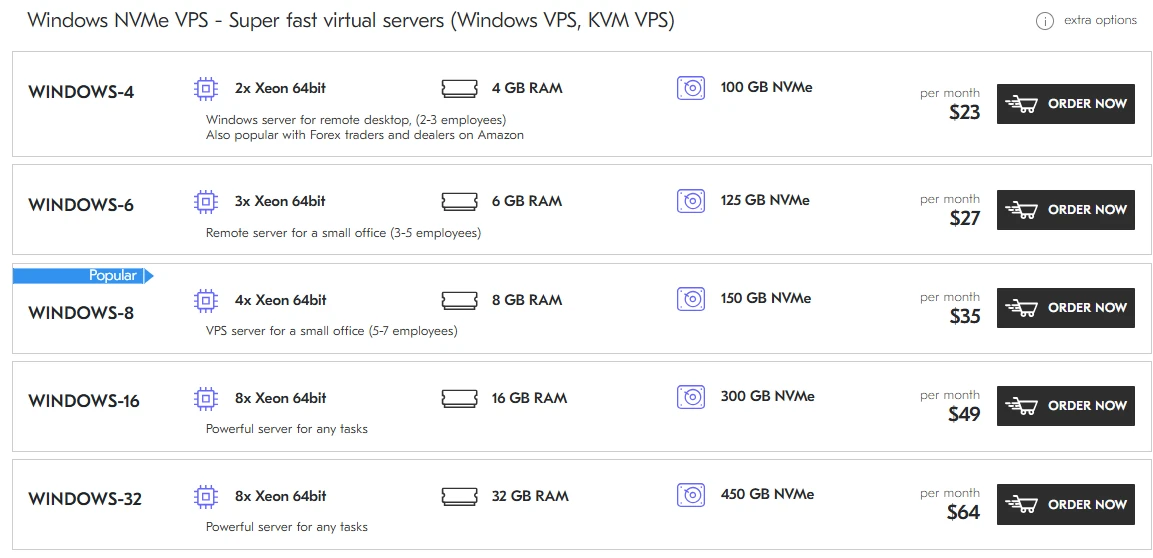
However, as your project grows, so does the bill. A mid-range server with 4GB of RAM and decent processing power might cost $20 to $40, while high-end machines for heavy databases can climb well over $100. When you compare these costs, think of it as insurance. You can pay $2 for a cheap shared host and lose $1,000 in sales when it goes down, or pay $20 for a VPS and sleep soundly. It is important for you to remember that the cheapest option often carries the highest "hidden" cost in terms of lost time and frustration.
Prices from the Deltahost website https://deltahost.com/vps.html.
Tailoring the Server to the Task
Every project is a different animal. For example, you need to host a WordPress blog with 500 visitors a day. A basic VPS is overkill; you just need stability. But what if you are building a custom iOS app backend that requires real-time data processing? Suddenly, latency and CPU clock speed become your best friends.
Consider the difference between a small family cafe and a massive logistics hub. Both need a roof and electricity, but their internal "engines" function differently. As you look at providers, check where their data centers are located. If your audience is in Europe, renting a server in New York will make your site feel sluggish. Does your current choice of location align with where your customers actually live?
The Learning Curve: Do You Need a Degree?
Working with a virtual server is a bit like owning a professional-grade espresso machine. It makes better coffee than a pod machine, but you need to know how to dial in the grind. Most VPS environments come with a "clean" Linux installation (like Ubuntu or CentOS). This means you—or your developer—will need to use the command line.
If you aren't comfortable with terms like SSH, APT, or Nginx, don't worry. Many providers offer "Managed" services or control panels like cPanel or Plesk. You might find that learning the basics of Linux is like learning to drive a manual transmission: it’s difficult at first, but it gives you ultimate control over the vehicle. Compare the "Unmanaged" (you do everything) vs. "Managed" (they help you) options carefully; your time is often more valuable than the extra $10 a month for support.
From Global Giants to Specialized Experts
In the vast sea of hosting, you have two main paths. On one side, there are the American titans. DigitalOcean is famous for its simplicity and developer-friendly "one-click" apps. Amazon Web Services (AWS) offers a universe of features that can honestly be a bit overwhelming for a newcomer.
On the other side, there are specialized players like Deltahost. Why consider them? Often, smaller or more specialized providers offer a level of "human" support and hardware flexibility that the giants can't match. For instance, Deltahost is known for its robust infrastructure in both Europe and the USA, providing a bridge for businesses that need to operate across borders without the "faceless" corporate feel of a massive conglomerate. You should compare the "big box store" experience of AWS with the "boutique" precision of a provider like Deltahost. Tell me, do you prefer a massive automated system or a team that actually knows your name?
Conclusion: Making the Leap into the Virtual Sky
In our modern era, a virtual server is no longer a luxury for tech enthusiasts; it is the backbone of any serious digital presence. Whether you are launching a startup, hosting a high-traffic blog, or managing a complex database, a VPS offers the perfect balance of power, privacy, and price. It is the most justified investment you can make to ensure your "digital homestead" isn't at the mercy of a neighbor's mistakes.
As you embark on this journey, I must warn you against the most common pitfall: the "set it and forget it" trap. Many users rent a powerful server but fail to secure it, leaving the digital "front door" unlocked. Always pay attention to your security updates and your backup frequency.
When choosing your provider, focus on these three pillars:
-
Uptime Guarantees: Look for 99.9% or higher. Your server is useless if it’s offline.
-
Support Response Time: Test their chat or ticket system before you buy. You need to know they’ll be there at 3 AM.
-
Scalability: Ensure you can upgrade your RAM or CPU with a single click as your dreams get bigger.
I wish you the very best of luck in finding the perfect digital home. May your latency be low, your uptime be high, and your choice be exactly what your project needs to thrive!