
Simple SPF Record Generator To Improve Email Deliverability

Email deliverability plays a vital role in ensuring your messages reach the intended recipients instead of being filtered into spam folders. One of the most effective ways to protect your domain and improve inbox placement is by publishing a properly configured Sender Policy Framework (SPF) record. An SPF record specifies which mail servers are authorized to send emails on behalf of your domain, helping prevent email spoofing, phishing attacks, and unauthorized use of your domain name. However, creating an accurate SPF record manually can be challenging due to complex syntax, DNS lookup limitations, and the need to include multiple email service providers.
Here's a polished version with **AutoSPF** naturally integrated:
Creating an SPF record manually can be confusing, especially when multiple email services are involved. AutoSPF simplifies the process by automatically generating a standards-compliant SPF record tailored to your email infrastructure. Whether you use Microsoft 365, Google Workspace, Mailchimp, SendGrid, or other email platforms, AutoSPF helps eliminate configuration errors, streamlines DNS setup, and strengthens your overall email authentication strategy. In this guide, you'll learn how SPF records work, how AutoSPF simplifies SPF deployment, the essential components of a valid SPF record, common configuration mistakes to avoid, and best practices for validating your setup to maximize email deliverability and domain security.
What an SPF Record Is and Why It Matters for Email Deliverability
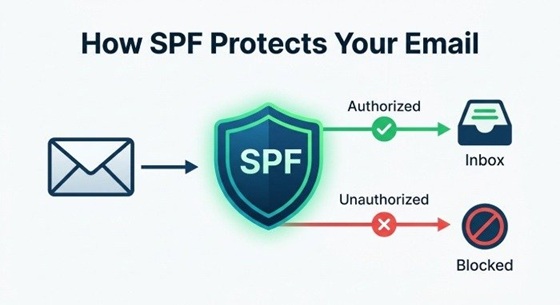
Sender Policy Framework (SPF) is a critical protocol in modern email authentication, governing which mail servers are authorized to send emails on behalf of a specific domain name. At its core, an SPF record is a specialized DNS record (specifically a TXT type) that lists authorized mail servers and their associated IP addresses or mechanisms. Its primary objective is to combat phishing, spoofing, and reduce the likelihood of your legitimate emails being flagged as spam.
A valid SPF record protects your domain reputation and strengthens your sender policy, enhancing email deliverability across all major inbox providers. High-volume email campaigns, transactional notifications, or even routine correspondence can face email delivery problems if the SPF specifications are not met. Maintaining strong email security is crucial; a faulty setup can lead to reduced sender reputation, compromised domain health, or even blacklisting on deliverability platforms such as MXToolBox or EasyDMARC’s Delivery Center.
Industry research from G2 Crowd, SourceForge, and Expert Insights verifies the powerful impact of SPF record management on inbox placement rates and overall email health. Integrating SPF with complementary protocols—such as DKIM, DMARC, and BIMI—forms a robust authentication framework for defending against increasingly sophisticated cyber threats.
How an SPF Record Generator Simplifies DNS Setup
Automating SPF Syntax and Reducing Errors
The process of creating and deploying an SPF record can be technical and error-prone when done manually—especially for businesses with complex email environments. An SPF record generator or SPF record creator is designed to automate the process, removing the guesswork from SPF specifications and complex syntax.
Platforms like EasySPF, SuperTool, MXToolBox, and EasyDMARC’s DNS Record Checker have created intuitive SPF tools that guide organizations step-by-step and integrate essential SPF mechanisms. These managed SPF solutions dramatically reduce the risk of common mistakes, such as oversights in the “include” directive or misconfigurations in IP address entries (IPv4 and IPv6). API references and tool integrations, such as those offered through EasySender, MSP Programs, or Reseller Programs, further streamline large-scale deployments and ongoing management.
SPF Record Generators: Streamlined for Efficiency
With an SPF record generator, users simply input their domain name, mail server IP addresses, third-party email provider details, and desired policy settings. The generator then compiles a standards-compliant SPF record ready for DNS record embed. This not only accelerates the initial setup but also ensures error-free manual edits and compatibility with alert manager and monitoring platforms.
The value of an SPF record creator extends to ongoing SPF lookups, record analysis, automated record validation, and real-time SPF Record Checks. This level of insight allows IT administrators to easily modify SPF records in response to system changes, improving overall cybersecurity posture and domain health.
Key SPF Record Elements: IP Addresses, Include Mechanisms, and Qualifiers
Essential Components of an SPF Record
A well-structured SPF record consists of several vital elements, each with a specific function dictated by SPF specifications. Understanding these is paramount for anyone looking to generate SPF or manually edit their configuration using an SPF record creator or generator.
IP Address Mechanisms (IPv4, IPv6, A record, MX record)
An SPF record typically contains mechanisms denoting which IP addresses or servers can send emails for a domain name. The most common are:
-
A record: Authorizes the static IP address associated with your domain's DNS A record.
-
MX record: Includes all servers listed in your domain's MX records.
-
IPv4 & IPv6: Explicitly specifies allowed IPv4 and IPv6 addresses or subnets.
SPF Include Mechanisms and Exists Mechanism
-
Include: The include: directive imports authorized IPs or policies from other trusted domains–vital for businesses using third-party senders (e.g., EasySender, Mailchimp, Touchpoint).
-
Exists mechanism: Used for advanced logic and conditional authorization, though less common in typical business configurations.
Qualifiers and Failure Policies
Qualifiers determine how tightly the policy is enforced when an unauthorized sender attempts delivery:
-
SoftFail (~all): Indicates questionable sources should be accepted but treated with caution.
-
Fail (-all): Direct instruction to reject all emails not matching the listed IPs or mechanisms.
-
Neutral (?all): No policy guidance; the receiving server chooses its own action.
Redirect mechanisms allow administrators to delegate SPF checking to another domain, while the record’s policy syntax also enables specification of fallback actions. Proper use of these elements enhances overall email authentication and helps ensure legitimate messages survive inbox placement checks.
Step-by-Step Guide to Creating and Publishing an SPF Record
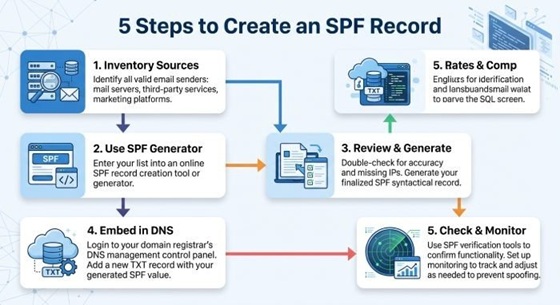
Step 1: Inventory ALL Email Sending Sources
Compile a comprehensive list of all platforms, servers, and third-party services authorized to send on behalf of your domain name. This includes corporate mail systems, marketing suites, and specialized platforms for notifications or campaigns. Consider leveraging insights from Email Health platforms, DNS Record Checker, or tools such as DMARC Failure Reports to identify hidden senders.
Step 2: Use an SPF Record Generator or Creator
Input the identified IP addresses, A records, MX records, and third-party domains into your preferred SPF record generator (e.g., EasySPF, MXToolBox, EasyDMARC). Specify any unique SPF syntax requirements, such as SoftFail versus Fail qualifiers or the use of exists or redirect mechanisms for advanced configurations.
Step 3: Review and Generate SPF
Use the SPF record creator to generate SPF output. Advanced generators often perform automatic syntax checks and basic record validation at this stage.
Step 4: Embed the Valid SPF Record in Your DNS
Copy the generated SPF record and embed it as a DNS TXT record in your domain hosting provider’s control panel. Ensure correct formatting and placement to prevent DNS propagation errors.
Step 5: SPF Record Check and Ongoing Monitoring
Leverage SPF Checker and SPF Raw Checker utilities to perform a DNS-level SPF Record Check, syntax check, and overall record analysis. Tools like SuperTool, Delivery Center, and alert manager modules can automate periodic SPF checks and trigger alerts if changes or failures are detected. For ongoing email verification and campaign performance, integrate with a deliverability platform (e.g., EasyDMARC, Touchpoint, Industry Research providers) to monitor sender reputation and email health.
Common SPF Record Mistakes and How to Validate Your Setup
Frequent Errors in SPF Deployment
Despite the help of SPF tools, several missteps can compromise the effectiveness of your SPF deployment:
-
Exceeding DNS lookup limits (10 maximum allowed by SPF specifications)
-
Incorrect SPF syntax or unescaped special characters
-
Omitting key mechanisms (missing MX record, A record, or IPv6/IPv4 inclusions)
-
Outdated third-party includes due to neglected record maintenance
-
Conflicting or redundant SPF records for a single domain name
These errors often lead to failed email authentication, delivery problems, or poor inbox placement, diminishing your brand’s email security and sender reputation.
Best Practices for Record Analysis and Validation
Use Dedicated SPF Checker Tools
Perform regular SPF Record Checks using reliable SPF Checker and Raw SPF Checker tools, such as those from MXToolBox, EasyDMARC, or SuperTool. These systems provide detailed SPF syntax validation, simulate recipient-side SPF lookups, and highlight actionable insights or failure points in your DNS record.
Advanced Validation and Monitoring
For more granular analysis, leverage email header analyzer utilities to trace email authentication outcomes, forensic DMARC failure reports, and phishing link checkers to verify no malicious components are authorized inadvertently.
Ensuring Email Health Through Ongoing Management
Combine regular SPF record analysis with proactive alert manager monitoring, and integrate with Reputation Monitoring and domain health dashboards for continuous protection. Programs such as MSP Program, Reseller Program, and managed SPF offerings are invaluable for enterprises looking to scale SPF record monitoring and rapid remediation workflows.
By using a modern SPF record generator and following best practices in SPF record creation and validation, organizations can significantly enhance their email deliverability, fortify their cybersecurity defenses, and maintain optimal sender reputation for their domain name.