
How to Protect Sensitive Data in Cloud Storage Systems
Cloud storage is now a normal part of daily work for both people and companies. It helps teams work together on shared files and makes backups simple. Services like Microsoft OneDrive, iCloud, and Google Drive are easy to use and widely available.
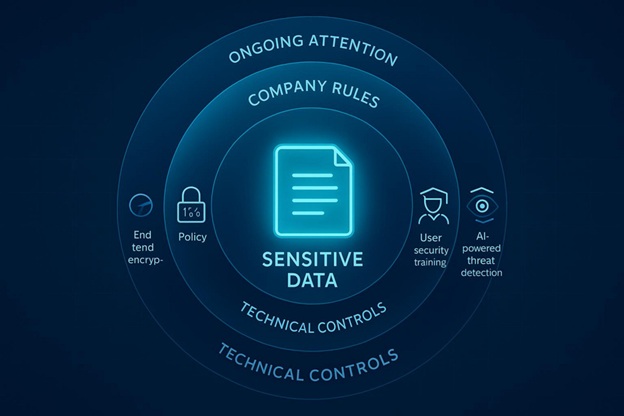
But that ease can also create risk: sensitive data still needs strong protection. Protecting it in cloud storage takes several layers, including solid technical controls, clear company rules, and ongoing attention to new risks.
For businesses, knowing these layers matters if you want to keep data private and accurate, which is why picking secure business cloud storage is a key first step.
What Is Sensitive Data in Cloud Storage Systems?
Sensitive data is any information that could cause harm if someone sees it, changes it, or deletes it without permission. The harm could be financial, legal, or related to reputation.
In cloud storage, this is often the most valuable data a company has, so it needs the strongest protection. Knowing what counts as sensitive data is the starting point for good security.
What Types of Sensitive Data Are Commonly Stored?
Sensitive data can mean many things, from personal details to private business information. Common types include Personally Identifiable Information (PII), such as contact information, social security numbers, ID numbers, and other personal identifiers. Exposed PII can cause serious problems, and studies show that many public cloud storage locations have contained PII.
Companies may also store Protected Health Information (PHI), such as diagnoses, prescriptions, and medical records. Payment Card Industry (PCI) data, like credit and debit card details, is another common target for attackers. Other important types include:
- Intellectual property and trade secrets
- Financial records
- Legal documents
- Employee data
- Business plans and internal strategy
IBM’s Cost of a Data Breach study reports a global average breach cost of $4.35 million, and that does not include long-term reputation damage and lost customers. Because of this, it’s important to identify what sensitive data you store so you can build the right cloud security plan around it.
How Does Cloud Storage Handle Sensitive Information?
Cloud systems use security methods for storing, accessing, and sending data. A key method is encryption, which turns data into a format that can’t be read without the correct key. Well-known cloud providers usually encrypt data:
- At rest (stored on servers)
- In transit (moving between your device and the cloud)
Cloud providers also use access controls and login protections to block unwanted access. This often includes multi-factor authentication (MFA) and role-based access controls so only approved people can view or change data. Some providers also support anonymization or pseudonymization so certain data elements are hidden while still being useful for analysis. Providers may also run intrusion detection, regular audits, and strong physical security in the data centers where servers are located.
What Are the Main Risks to Sensitive Data Stored in the Cloud?
Cloud storage brings clear benefits, but it also creates risks. Since cloud systems are shared and spread out, a mistake or weak setup can expose data faster than many people expect. Knowing the main risks helps you plan ahead.
How Does Accidental Exposure Occur?
Accidental exposure is a common cause of cloud data leaks. In cloud platforms, it is possible to set storage in a way that makes it visible on the internet (for example, a public storage bucket). Laminar Labs research found PII in one in five public cloud storage buckets, showing how often this happens.
This often comes from weak data governance. If a company does not set clear rules-or does not check if the rules are being followed-sensitive data can end up in unsafe places. Developers and other staff may focus on shipping work fast and may not notice that a setting is public by default.
Why Is Improper Access Management a Threat?
Access management becomes risky when too many people (or outside tools) have more access than they need. For example, a user with broad permissions might copy sensitive data into a folder that is not approved or monitored. If that person later leaves the company, the copied data can remain behind as “shadow data” that no one tracks.
Third-party tools can also add risk. Many teams connect SaaS tools or CI/CD systems to cloud storage. If those tools get wide permissions, and the tool has a security issue, your data may be exposed. This is why the principle of least privilege matters: give the minimum access needed for the job.
What Are the Implications of Cloud Data Breaches?
A cloud data breach can lead to theft, changes to data, or data loss. Costs include recovery work, downtime, and direct financial loss. Reputation damage can last longer and can push customers away.
Breaches can also create compliance failures. Cloud data is often covered by rules such as GDPR, HIPAA, and CCPA. If you break these rules, you may face fines, lawsuits, and required reporting. Cloud sharing also increases risk: if many people use shared drives, one stolen account can open access to a lot of shared content.
How Can Data Movement Lead to Exposure?
Cloud systems make it easy to copy and move files quickly. That speed helps work get done, but it can also spread sensitive data into places you don’t expect.
Uncontrolled copying often creates “shadow data,” which means unknown and unmanaged copies of sensitive information. Examples include:
- Copies left in old folders or projects
- Backups that are no longer used but still exist
- Embedded databases that are not listed
- Cached logs from applications
These copies can fall outside your normal security controls, making them easier targets. Data that started out protected can become exposed simply because it was duplicated into an unsafe location. This is why ongoing discovery and classification matter across all cloud storage areas.
How Does Cloud Data Protection Differ from Traditional Data Security?
Cloud data protection and traditional data security both try to prevent unauthorized access, loss, and damage. But the environments are different, so the tools and responsibilities also change.
How Does Data Location Affect Security Controls?
With traditional systems, a company usually owns and runs the servers. Data lives inside company buildings or private data centers, so physical security (locked rooms, staff, surveillance, fire protection) is managed directly.
In cloud systems, the servers are owned and managed by the cloud provider and are often far away. You depend on the provider for physical security. At the same time, cloud data can be accessed from anywhere, so you need strong access controls that do not rely on a physical office network. Cloud systems also scale quickly, so security needs to keep up as storage and services grow or shrink.
How Does the Shared Responsibility Model Work?
Cloud security commonly follows a shared responsibility model. The cloud provider is responsible for security of the cloud, including the buildings, hardware, network, and core platform layers. They patch and maintain the underlying systems.
The customer is responsible for security in the cloud. This includes:
- Protecting and configuring your own data and storage
- Identity and access management (users, roles, MFA)
- Application security
- Network and service configuration
Unlike traditional setups where one IT team often handles everything, cloud security requires customers to actively do their part. Even if the provider protects the infrastructure, weak permissions or bad settings on the customer side can still lead to a breach.
What Strategies Improve Sensitive Data Protection in Cloud Storage?
To protect sensitive cloud data well, you need several strategies that cover different risks and different data states. This goes beyond basic settings and builds a stronger defense.
How Does Data Classification and Labeling Increase Security?
Data classification and labeling are core parts of cloud security. You group data by sensitivity, value, and legal requirements. When you know what data is most sensitive, you can focus your strongest controls on it.
Labels also make access control easier. You can assign permissions based on the label so only the right people can open or edit that data. This also supports compliance because many rules (like GDPR and HIPAA) expect you to know what sensitive data you have and where it is. Classification can also work with Data Loss Prevention (DLP) tools to spot and block risky sharing.
Clear labels help users recognize when they are handling sensitive content. Tools like Azure Information Protection can classify, label, and protect files and emails so the classification stays visible even when content is shared.
How Can Organizations Secure Data During Cloud Migration?
Moving data to the cloud needs a planned, step-by-step approach so you don’t create new gaps.
Key steps include:
- Data Classification: classify data before moving it so protections match the risk level.
- Cloud Provider Evaluation: choose a provider with strong security controls and compliance support.
- Encryption: encrypt data at rest and in transit during the full migration process.
- Strong Access Controls: use MFA and role-based permissions so only approved users can access data.
- Backup and Recovery Plan: create and test backups before migration to reduce data loss risk.
- Secure Data Transfer: use encrypted transfer methods and integrity checks to confirm data wasn’t changed.
- Regular Audits: check settings and access during and after migration.
- Training: train staff on new cloud security steps and safe handling rules.
- Compliance: follow rules like GDPR and HIPAA during migration.
- Continuous Monitoring: watch for threats and unusual activity after the move.
What Role Does Encryption Play in Protecting Cloud Data?
Encryption is a core control for protecting sensitive data. It converts readable data into unreadable text that can only be opened with the correct key. Encryption supports privacy, compliance, and data control.
Cloud encryption should cover:
- Data at rest: stored data on disks and storage systems. Many services encrypt at rest by default, but you may be able to add stronger options, such as host-level encryption for virtual machines.
- Data in transit: data moving across networks. End-to-end encryption using SSL/TLS is important here.
If data is not encrypted in both states, it can be stolen if someone intercepts traffic or gains access inside the provider environment.
Why Is Key Management Central to Cloud Data Protection?
Encryption depends on keys, so key management is a central part of protection. If an attacker gets the keys, they can read the encrypted data.
Many cloud providers offer key management services and Hardware Security Modules (HSMs) to store and protect keys. For example, Azure Key Vault Premium or Azure Key Vault Managed HSM can be used to manage encryption keys while keeping customer control. Key rotation also matters. When a Key Encryption Key (KEK) is rotated, services may re-wrap Data Encryption Keys (DEKs) with the new key version, while the data itself is not re-encrypted. Old and new key versions must stay active until re-wrapping finishes.
If a customer-managed key may be compromised, rotate to a new key and update dependent services before disabling or deleting the old key. If you disable the key too soon, you can take services offline while still leaving risk around how DEKs were protected.
How Does Monitoring User Activity Prevent Data Exposure?
User activity monitoring helps prevent exposure because cloud environments change often. You need to watch who accessed what, when, from where, and how.
Cloud tools can alert you about unusual events like:
- logins from strange locations
- large downloads
- repeated failed login attempts
Regular log reviews and access audits help you confirm rules are being followed and spot possible insider risk. Data Security Posture Management (DSPM) tools can also help by finding cloud data continuously, classifying it, detecting policy violations, and guiding fixes. This helps teams fix exposures without blocking normal business work.
What Are the Best Practices for Managing Sensitive Data Across Cloud Environments?
Managing sensitive cloud data well requires you to handle storage, identity, and sharing in a connected way. Following common best practices across these areas improves security.
How to Protect Data at Rest
Data at rest is stored on physical media like hard drives or SSDs. Encrypting data at rest is a required step for privacy and compliance. Many cloud services (like Azure Storage and Azure SQL Database) encrypt at rest by default.
You can strengthen protection by:
- using host-level encryption for virtual machines to encrypt temporary disks and caches
- using customer-managed keys through services like Azure Key Vault for more control and governance
- enabling encryption before writing sensitive data to cloud services
How to Protect Data in Transit
Data in transit is data moving between systems, apps, and locations. It can be intercepted if it is not protected. A strong approach is to always use SSL/TLS when sending data across networks, since it encrypts the connection.
For traffic between on-premises systems and cloud systems, extra protection helps, such as:
- VPNs to create a secure tunnel for communication
- Azure VPN Gateway for encrypted traffic between Azure networks and on-premises locations
- ExpressRoute for high-speed WAN links, with added application-level encryption when needed
If you don’t protect data in transit, you are more open to man-in-the-middle attacks, eavesdropping, and session hijacking.
How to Protect Data in Use
Data in use is data being processed in memory. This has been hard to protect because data is often unencrypted once loaded into memory, which can allow attacks like memory scraping or side-channel attacks.
Newer options help close this gap. Azure confidential computing uses special AMD and Intel-based Confidential Compute VMs to keep data encrypted in memory with hardware-managed keys. This reduces the Trusted Computing Base (TCB), meaning fewer parts of the system must be trusted for security.
It can help with compliance and can support secure collaboration where multiple organizations analyze data together without exposing raw sensitive information. It can also support “blind processing,” where even the provider cannot retrieve user data.
How to Use Identity and Access Management Effectively
Identity and Access Management (IAM) controls who can access cloud data. Strong passwords matter, but passwords alone are often not enough. Multi-Factor Authentication (MFA) adds a second check, such as a one-time code from an app.
Other IAM best practices include:
- applying least privilege (only give access needed for the task)
- reviewing permissions often to reduce privilege creep
- using endpoint protection, since many attacks target user devices
- training users to spot phishing, since stolen credentials are a common way attackers enter cloud accounts
Should You Segment and Limit Data Sharing?
Yes. Segmenting data and limiting sharing reduces risk. If everyone can access everything in one shared drive, one stolen account can lead to a major incident. Segmentation splits data into smaller areas based on type or sensitivity, which limits how much damage a breach can cause.
Least privilege also applies to sharing. Only people who need access for their job should have it, and access should be reviewed often and removed when it’s no longer needed. Data classification supports this by setting clear rules about what can be shared, with whom, and with what rights (view, edit, download, share).
How Does Compliance Affect Cloud Data Protection?
Compliance is a major part of cloud data protection. It affects how you set up cloud systems, how you handle data, and how you prove you are protecting it.
What Regulations Influence Sensitive Data Storage?
Many laws and standards control how sensitive data can be stored and processed. Common examples include:
- GDPR (EU privacy rules)
- HIPAA (US health data rules)
- CCPA (California privacy rules)
- PCI DSS (payment card security standard)
- GLBA (US financial services rules)
These standards often require specific controls such as encryption, access controls, and regular audits. If you build these controls into both the provider setup and your own cloud configuration, you reduce risk while meeting legal requirements. If you don’t comply, you may face fines, lawsuits, and loss of trust. Compliance rules also influence provider choice, security settings, and safe ways to process data.
Why Is Auditability Important in Cloud Environments?
Auditability means you can track and review actions in your cloud system, such as data access, data changes, configuration updates, and security events. This supports accountability, compliance, and better security over time.
Regular audits and assessments help you find weaknesses before attackers do. In an incident, detailed audit logs help you investigate what happened, what data was affected, and how the breach started. Logs can also help prove compliance during regulatory reviews. Tools like intrusion detection and automated alerts can speed up detection and response. Without strong auditability, it becomes hard to measure risk, respond quickly, or prove that required controls are in place.
How to Evaluate and Choose Secure Cloud Services
Choosing a cloud provider is one of the biggest decisions for protecting sensitive data. It’s not only about features and cost-it’s also about how much you can trust the provider to protect your information.
What Criteria Should You Use When Assessing Cloud Storage Providers?
When reviewing cloud storage for sensitive data, use strict criteria.
Key areas to check include:
- Provider reputation and history of strong security
- Encryption for data at rest and in transit
- Strong authentication options, including MFA
- Compliance certifications that match your needs
- Clear details about security practices, data handling, and incident response
- Support for data classification, fine-grained access controls, and automated backups
- Company headquarters and local privacy laws, since governments may request access to data
For schools and large organizations, the service should also meet internal policies, and contracts should include clear IT security and privacy requirements, plus an approach for ongoing vendor compliance checks.
How Do Vendor Security Practices Impact Data Protection?
A vendor's security practices strongly affect your risk, since you give up direct control of the physical servers. If the vendor's security is weak, the risk grows for every customer using their systems.
Vendor practices set the baseline for infrastructure protection, including how often systems are patched and how quickly known issues are fixed. If patching is slow or weak, attackers can exploit old flaws. Vendor lock-in can also create risk if you later need to move large amounts of data to a new provider. Because of this, vendor risk management should be ongoing: work with procurement and security teams to review vendors, add strong security terms to contracts, and monitor compliance over time.
Choosing providers with transparent security models and strong privacy commitments—such as Proton, which operates under Swiss privacy laws and publishes independent security audits—can reduce exposure to vendor-related risks. Even though the provider runs the infrastructure, the customer still carries major responsibility for protecting institutional data and user privacy.
Key Takeaways for Protecting Sensitive Data in Cloud Storage Systems
Protecting sensitive data in cloud storage is ongoing work, not a one-time task. Cloud services change quickly, and attackers change their methods just as fast. Strong cloud protection needs a full plan that combines modern technical controls, clear internal rules, and everyday security awareness.
Technology like layered encryption and strict access controls is important, but people also play a big part. Ongoing training for all staff-new employees, regular users, and executives-helps reduce mistakes. Training should include password habits, phishing awareness, and a clear understanding of personal responsibility under the shared responsibility model.
A proactive security approach such as Zero Trust is also now a normal expectation: don’t automatically trust users or devices, and verify access every time. Newer tools like Data Security Posture Management (DSPM) and confidential computing can support this by improving visibility, speeding up fixes, and protecting data even during processing.
Good cloud data protection is about more than avoiding fines or stopping breaches. It helps you keep customer and stakeholder trust, support safe innovation, and use cloud systems without giving up privacy, accuracy, and availability of your most important information.